

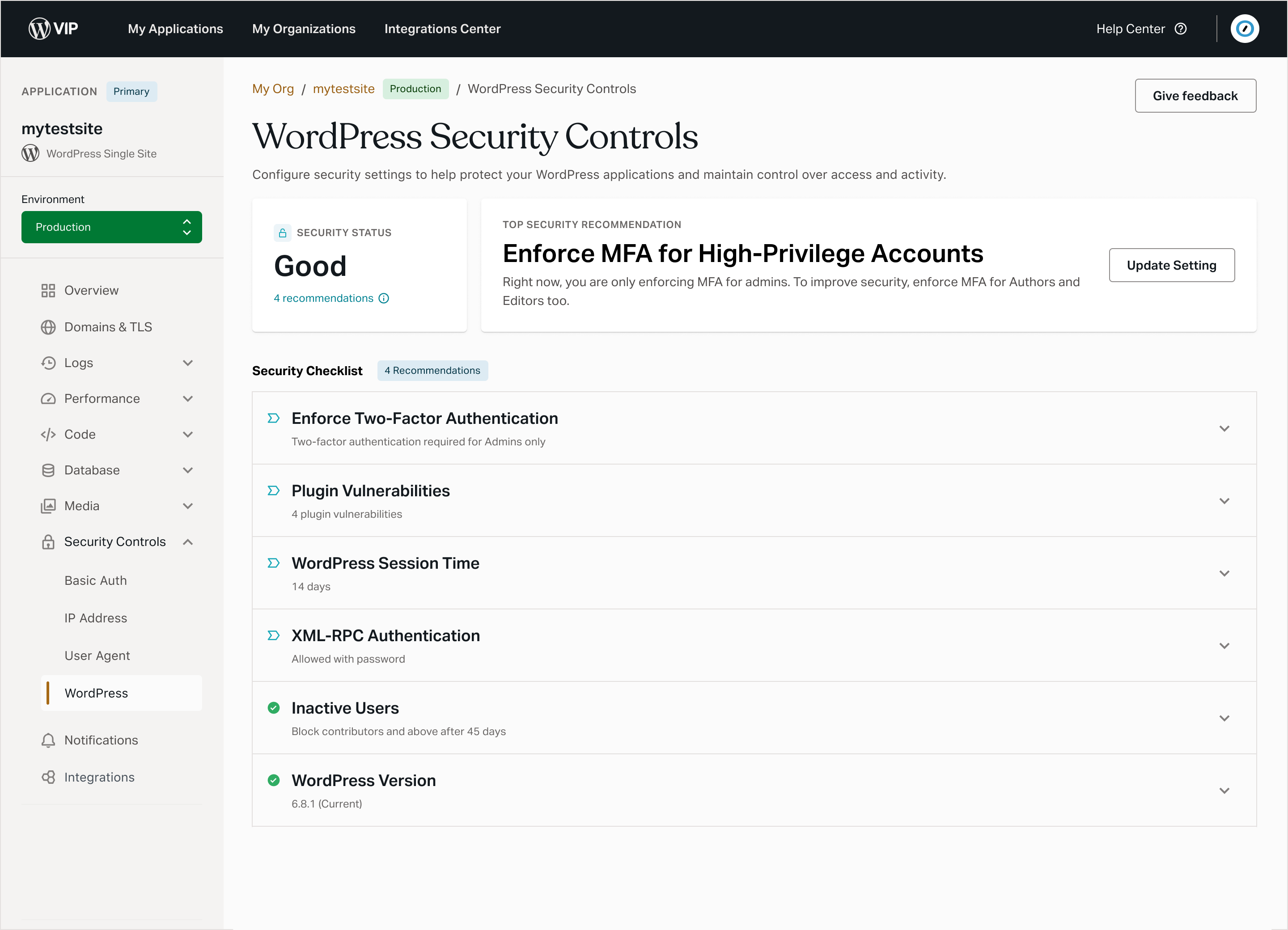
With WordPress Security Controls, we’re introducing a new layer of platform-level protection, bringing together enforced security baselines, configurable settings, and clear visibility into your WordPress environment’s security, all through the VIP Dashboard. It’s a tightly integrated solution that helps protect your WordPress environments by enhancing user account security and limiting the attack surface of your environment.
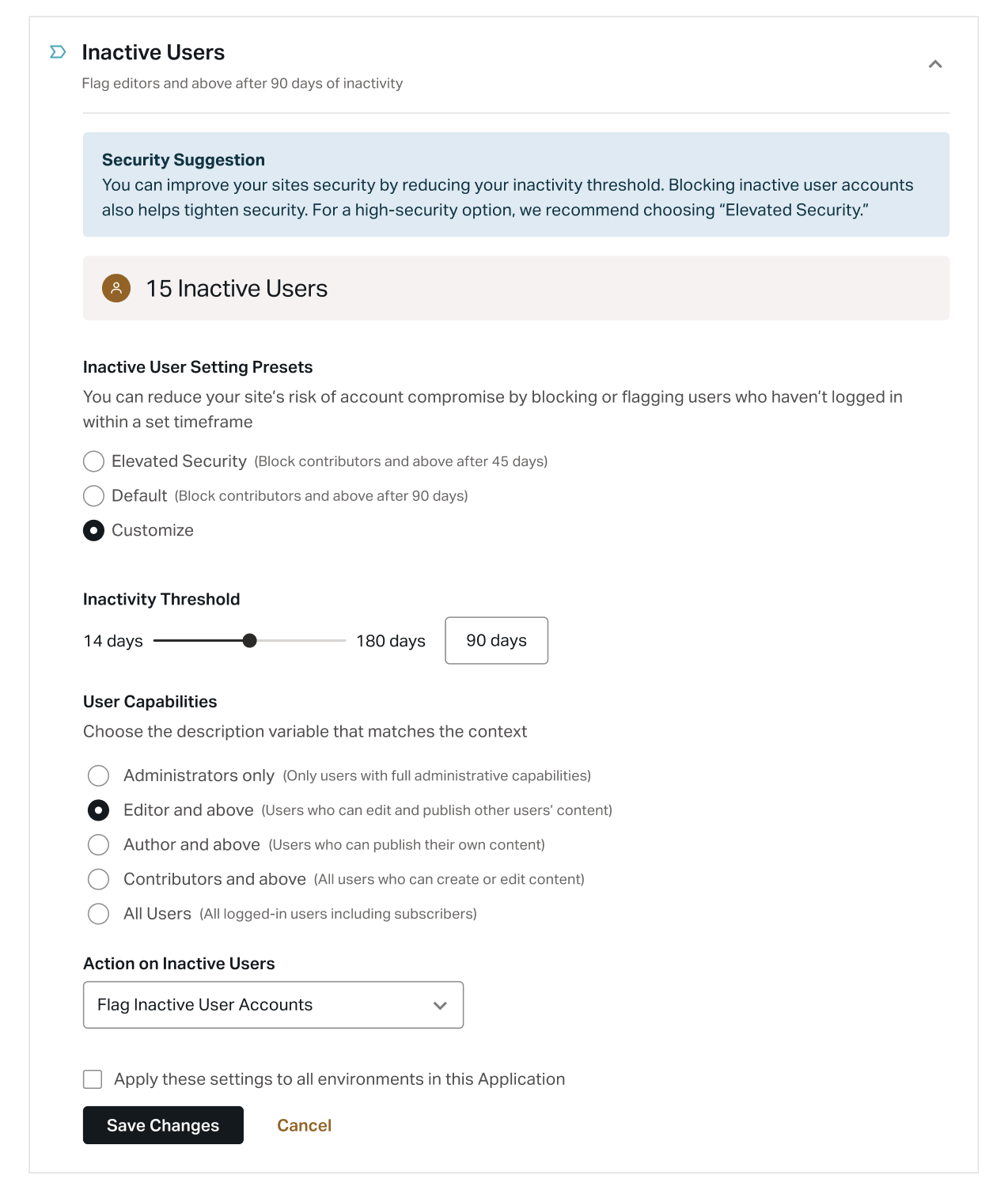
- Inactive User Management: Monitor user activity and automatically flag or block WordPress user accounts that exceed custom inactivity thresholds.
- Enforce 2FA: Automatically enforce Two-Factor Authentication for users with specific access levels in the WordPress Dashboard.
- XML-RPC Authentication Type: Choose how XML-RPC is secured without disrupting the Jetpack connection.
- Limit Session Time: Define how long your WordPress users stay logged in to the WordPress Admin dashboard before being required to log in again.
- Highlight 2FA Users: Quickly identify how many high-privilege users (
AdministratorandEditorroles) have Two-Factor Authentication disabled, and filter to view them. This setting is non-configurable. - Email Notifications: Receive an email when a new
AdministratororSuper Adminis added, or when an existing user is promoted to these roles. This setting is non-configurable.
These modules will be available directly in the VIP Dashboard and applied at the platform level, which may impact custom code in some environments.
When will it go live?
We’ll roll out WordPress Security Controls in phases:
- New environments: Enabled by default starting
Tuesday, August 19, 2025Wednesday, August 20, 2025. - Existing non-production environments: Also enabled by default starting
August 19August 20. You can disable and re-enable the feature’s configurable modules in the VIP Dashboard to ensure compatibility with any custom code. - Existing production environments: Existing production environments won’t be affected initially. You can disable and re-enable the feature’s configurable modules in the VIP Dashboard to ensure compatibility with any custom code.
Note: The ability to disable the feature will be removed once enforcement begins, which is currently planned for the last quarter of the year. We’ll share more details in the coming weeks.
If you participated in the beta testing of this feature, your existing configurations will remain unchanged. However, default settings will apply to new environments, as well as any existing environments where WordPress Security Controls is not currently enabled.
When enforcement begins, WordPress Security Controls will be enabled by default on all WordPress environments with default settings. Any production or non-production environment that does not already have the feature enabled will be automatically updated. After this date, the feature cannot be disabled. We will share more details in the coming weeks.
What about custom code?
WordPress Security Controls is the primary, recommended way to manage security. We strongly encourage moving any code-based logic to the managed settings in the WordPress Security Controls feature on the VIP Dashboard.
By default, our controls will take precedence unless you explicitly override them. Where feasible, we honor environment-level customizations; however, outcomes can vary based on the hooks you use and their load order.
Module-specific guidance
- Inactive User Management: This security setting relies on around 20 different WordPress hooks. Because of this breadth, a reliable code-level override isn’t practical. If you need different behavior, please contact Support and we can disable this specific setting for your environment.
- Enforce 2FA: If you are using the
wpcom_vip_is_two_factor_forcedfilter to enforce 2FA for:- All users: No changes are required. Your existing code will continue to work.
- Specific roles or capabilities: Your existing code will continue to work. We suggest configuring enforcement through WordPress Security Controls or adopting our new filter:
- Current filter:
wpcom_vip_is_two_factor_forcedsupports roles and capabilities; will override settings enforced by WordPress Security Controls. - New filter:
wpcom_vip_wsc_forced_mfa_users_additional_capabilitiessupports capabilities only; works in tandem with settings enforced by WordPress Security Controls.
- Current filter:
- Disable 2FA for all users: No changes are required. Your existing code will continue to work. We strongly advise against disabling 2FA entirely; if you need more granular control, we recommend managing enforcement through the WordPress Security Controls feature.
The wpcom_vip_is_two_factor_forced filter will be deprecated in the future. We recommend configuring your enforcements through WordPress Security Controls in the VIP Dashboard.
// Example usage: wpcom_vip_wsc_forced_mfa_users_additional_capabilities filter
// Enforce 2FA for settings enforced by WordPress Security Controls, plus everyone who can edit private pages and upload files.
add_filter( 'wpcom_vip_wsc_forced_mfa_users_additional_capabilities', function () {
    return [ 'edit_private_pages', 'upload_files' ];
} );
- XML-RPC Authentication: No code-based overrides are required. Set the XML-RPC Authentication setting to “Default protections” in the VIP Dashboard WordPress Security Controls page to disable our added logic.
- WordPress Session Time: Implement your custom logic using the
auth_cookie_expirationfilter and set the “WordPress Session Time” setting to “Default” in the VIP Dashboard WordPress Security Controls page. The session time specified in your code will be enforced. If you are using a filter besidesauth_cookie_expiration, we cannot guarantee that your custom logic will take precedence.
- Highlight 2FA Users (non-configurable): If you use SSO for all WordPress user logins, please contact Support and we can disable this specific setting for your environment.
- Privileged User Email Notifications (non-configurable): This is a non-configurable security setting. If you need this feature disabled, please contact our Support team.
General override
You can control when your custom code executes in relation to ours by setting your hook priority to run after muplugins_loaded:5 (e.g., with a priority of 6). The order of hooks in your custom code can affect how our hooks load, and your override may not work as intended.
add_action(
    'muplugins_loaded', // Execute after all mu-plugins are loaded
    function() {
        add_filter(
            'auth_cookie_expiration', // Override the auth cookie expiration time (example filter)
            function() {
                return 2 * DAY_IN_SECONDS;
            },
            100 // WordPress Security Controls implements it with priority 99, so use 100 to override it
        );
    },
    6 // Priority 6 makes sure this runs after WordPress Security Controls
);
Note: Broad calls to remove_all_filters can impair or disable WordPress Security Controls. Please audit and avoid broad filter removal where possible.
We’ve compiled a list of all the WordPress hooks we use in WordPress Security Controls to further help you identify and resolve any potential conflicts with your custom code. The underlying logic for the WordPress Security Controls feature is also open source and available for review in the VIP Security Boost GitHub repository.
If you have any questions about WordPress Security Controls and how it might affect your WordPress environment, please contact our Support Team.